An AI mental model for automation builders
Outcome: You can explain tokens, context, prompts, inference, temperature, hallucination, structured output, tools, the agent loop, and evaluation, and mark which parts of a sample workflow should use a model.
Outcome
By the end of this lesson you will be able to explain, in plain language, the handful of terms the rest of the course depends on: token, context window, prompt, inference, temperature, hallucination, structured output, tool, agent loop, and evaluation. You will also be able to look at a sample workflow and mark which steps should use a language model and which should stay ordinary deterministic code. This lesson writes no code and makes no cloud call.
LLM stands for Large Language Model: the kind of AI this course uses. It is a program that predicts likely text given the text it has seen so far.
Mental model
You already think in workflows: a trigger starts a run, each step does one thing, conditions route the flow, and a data mapper reshapes values between steps. An LLM is a new kind of step you can drop into that same picture.
Here is the single most important idea in the whole course:
- Ordinary workflow steps are deterministic. The same input always produces the same output. A “convert currency” node is deterministic.
- A language model step is probabilistic. It predicts likely text, so the same input can produce slightly different output from run to run.
You use a deterministic step when the rule is known and exact. You use a model step when the input is fuzzy human language that no fixed rule can parse reliably, such as “read this email and tell me what the customer wants.”
Where the analogy stops: a normal node either succeeds or errors. A model step can succeed and still be wrong in a way that looks completely confident. That is why, later in the course, every model output is checked by deterministic code before anything acts on it.
Prerequisites and cost
- Lesson 0 complete. You need nothing installed for this lesson specifically, but the course order assumes your tools are ready.
- No cost. Reading and the exercise are free; there is no code to run and no cloud call.
Verified on 2026-07-15 against the model and terminology sources in
docs/research-log.md.
The terms, in the order they build on each other:
- Token. Models do not read whole words; they read tokens, which are short chunks of text (often a word or part of a word). “automation” might be one token; “reconfiguration” might be three. Tokens matter because you are billed per token and every model has a token limit. This is the model’s unit of both input size and cost, a little like counting rows processed in a workflow run.
- Context window. The context window is the maximum number of tokens the model can consider at once: your input plus its output. Think of it as the model’s short-term working memory for a single request. Go over the limit and older content must be dropped or summarized.
- Prompt. The prompt is the text you send the model: your instructions plus any data. It is the closest thing to configuring a node, except you configure it with sentences instead of fields.
- Inference. Inference is one run of the model: it reads the prompt and predicts the output tokens. Each inference is one billable model call, the way one workflow run consumes one unit of quota.
- Temperature. Temperature is a setting from 0 upward that controls how much randomness the model uses when picking each next token. Low temperature gives steadier, more repeatable output; higher temperature gives more varied output. For extracting structured data you want low temperature.
- Hallucination. A hallucination is confident output that is simply wrong: an invented fact, a made-up system name, a fake citation. It is not the model lying; it is the model predicting plausible-looking text when it has no real basis. This is exactly why model output must be validated by code.
- Structured output. Structured output means forcing the model to answer in a fixed shape (specific named fields) instead of free prose, so a program can use the result. It is the model version of a data mapper’s typed output.
- Tool. A tool is a function you let the model call to get a fact or perform an action it cannot do on its own, such as looking up a record. It is the model’s version of an action node or connector.
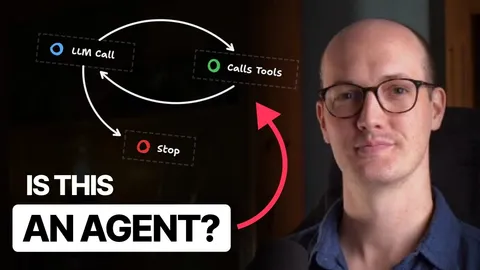
- Agent loop. An agent loop is the repeating cycle where the model reads the situation, decides whether to call a tool, reads the tool’s result, and then either calls another tool or gives a final answer. It is a workflow that the model routes at run time instead of you wiring every branch in advance.
- Evaluation. Evaluation is testing model behavior against a fixed set of example inputs and expected properties, because you cannot eyeball a probabilistic step the way you would a deterministic one. It is the model version of testing a workflow before you publish it.
Smallest code sample
This lesson has no code to run. The sketch below is an illustration only to make the deterministic-versus-model split concrete. Do not type or run it; you will write and run the real version starting in Lesson 2.
Intake step for a work request:

  1. Trim and length-check the raw text        -> deterministic (a fixed rule)
  2. Read the English, figure out what's wanted -> MODEL (fuzzy human language)
  3. Force the answer into fixed fields          -> MODEL (structured output)
  4. Reject the answer if a field is invalid     -> deterministic (a fixed rule)
  5. Reject if the model's confidence is too low -> deterministic (a fixed rule)
Read it top to bottom: only steps 2 and 3 need a model, because only they deal with fuzzy meaning. Steps 1, 4, and 5 are exact rules, so they stay deterministic. This split is the backbone of the capstone you build over the next three lessons.
Expected output
There is no program output in this lesson. Your checkpoint is a decision you make by hand, described in “Verify it yourself” below. You have finished the learning part when you can say, for each term above, one sentence in your own words and its closest visual-automation idea.
One common failure
Symptom: you treat a model step like a deterministic node and trust its answer directly, and later a workflow acts on a value the model invented (a hallucination).
Diagnosis: the mistake is assuming “the model returned an answer” means “the answer is correct.” A probabilistic step can be confidently wrong. If nothing downstream checks the answer, a made-up system name or a wrong category flows straight into an action.
Fix: never let a model step be the last word. Put a deterministic check after every model step: validate the shape, confirm referenced facts against a real source, and set a minimum confidence. That is exactly the pattern Lessons 3 and 4 implement. In this lesson the fix is a habit: whenever you mark a step as “model,” also plan the deterministic check that guards it.
Why this works
Separating probabilistic from deterministic work is what keeps an AI feature safe and testable. Deterministic steps are cheap, repeatable, and easy to test, so you keep as much logic there as possible. You spend a model call only on the one thing code cannot do well: interpreting fuzzy human input. Then you hand the result straight back to deterministic code to check and act on. This is why the course builds the boring, exact parts first and adds model judgment only where it earns its cost.
Verify it yourself
Take this five-step workflow for handling an inbound support message:
- Receive the message (a trigger fires).
- Decide the customer’s intent from the free-text message.
- Look up the customer’s account ID from their email address in a database.
- Draft a friendly reply summarizing next steps.
- Send the reply only if a human approves it.
For each step, write “model” or “deterministic” and one sentence of justification. A correct answer marks steps 2 and 4 as model work (interpreting and generating human language) and steps 1, 3, and 5 as deterministic (an event, an exact database lookup, and a fixed approval gate). If you can defend that split, you have hit this lesson’s checkpoint and are ready to make your first real model call in Lesson 2.
Cleanup
Nothing to clean up. This lesson creates no file and no cloud resource.